Minor faults in subtitle spotting become conspicuous at hard cuts. If text survives briefly into the following shot, or vanishes at the instant of the edit, attention is diverted towards the subtitle just as a fresh composition demands visual appraisal. European broadcast QC routinely treats these collisions as delivery matters, since the specification covers how spotted events relate to speech and to edits in the picture.
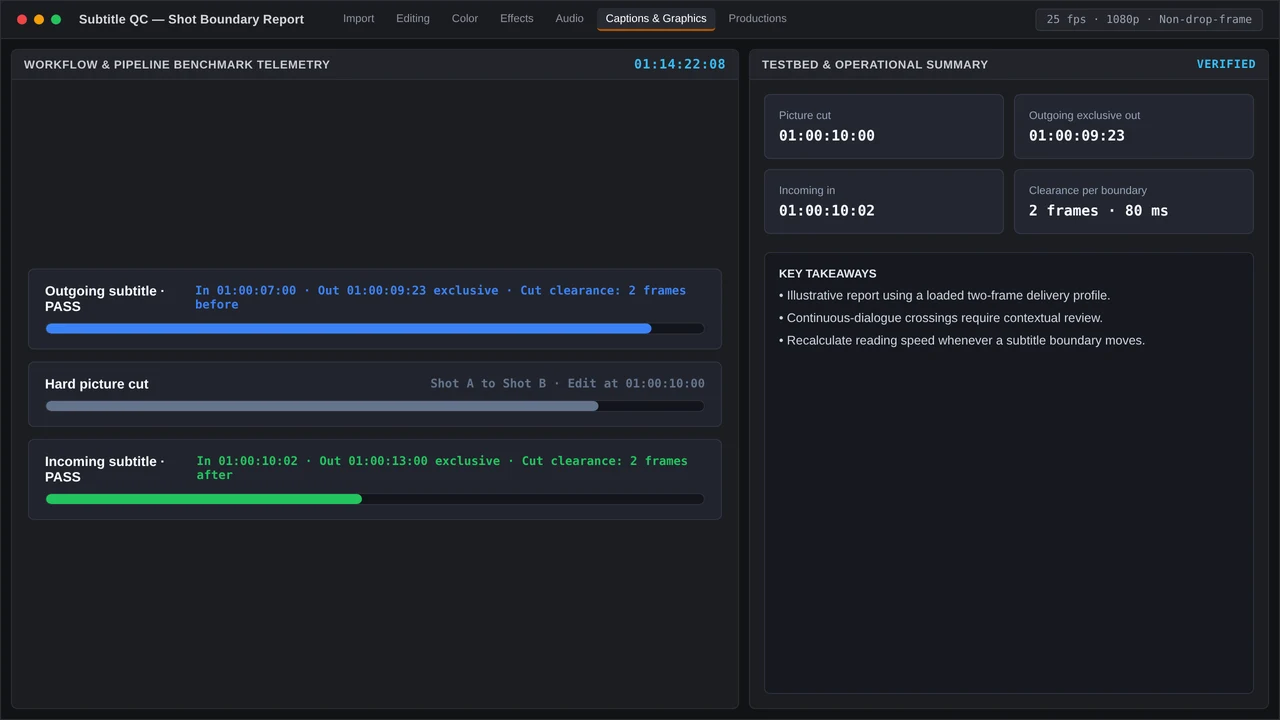
The 2-frame convention applies where an outgoing event and its successor meet a hard cut. Preserve the specified minimum separation, holding each affected subtitle boundary no closer than 2 frames to the picture edit. Should ordinary speech timing otherwise carry text through the transition, set the outpoint with a minimum 2-frame lead before that edit, or give the inpoint a minimum 2-frame delay after it. An event may cross the edit when dialogue runs continuously through the transition.
What Are the Verified Benchmarks for Spotting Subtitles Across Hard Shot Cuts 2 Frame Gap Rule?
Although the picture changes, subtitles remain anchored to a consistent screen position. Reading therefore has to continue while a viewer assimilates a new shot if an event crosses the cut; simultaneous removal of text and replacement of the image on one frame can instead resemble a flash. The 2-frame separation used in European QC distinguishes these visual occurrences. At 24 fps, certain facilities increase the post-cut gap to 3 frames for scene changes with exceptionally strong contrast.
Trimming frames beside a cut also subtracts reading time. For adult English, Netflix specifies maxima of 20 characters per second (CPS) and 42 characters per line (CPL); BBC guidance gives a recommended rate of 160 to 180 words per minute [Netflix Partner Help Center Timed Text Style Guide, 2025]. Reading speed must consequently be calculated again whenever either boundary moves, because a compliant event before trimming can exceed its limit once shortened.
Acoustic criteria accompany these timing provisions in the delivery specification. EBU R128 requires European broadcast masters to measure -23.0 LUFS integrated loudness, with a tolerance of ±0.5 LU; the US ATSC A/85 specification calls for -24 LKFS [EBU R128 Loudness Recommendation, 2024]. A master intended for both markets should have its relevant spotting and loudness values recorded before the spotting pass is closed. Both belong to one finishing schedule, yet programme loudness and subtitle timing demand independent verification.
Timing choices acquire additional weight in burned-in versions. With device audio muted for as many as 75% of viewers in mobile social feeds, captions carry a considerable share of comprehension [Verizon Media & Publicis Mobile Viewing Study, 2024]. This helps explain the frequent use of burned-in captions based on MOGRT-style graphics for vertical delivery. Rasterising an incorrectly spotted event fixes that error in the image; an SRT replacement will leave the master unchanged, so another picture render is required.
Long-form video podcasts present comparable difficulties, especially on timelines containing frequent multicamera edits. Weekly podcast consumers across the United States show a 46% preference for active-video viewing over audio-only listening [Edison Research Infinite Dial & Podcast Consumer Report, 2025]. YouTube reports monthly active viewership of podcast content above 1 billion [YouTube Official Blog, 2025]. Each cut on a burned-in caption timeline therefore warrants inspection, with particular attention to brief speaker turns that compress the reading interval between edits.
| Delivery Context | CPS Ceiling | CPL Ceiling | Gap Rule at Hard Cuts | Loudness Target |
|---|---|---|---|---|
| European broadcast (EBU territory) | 20 CPS | 42 CPL | 2 frames minimum | -23 LUFS integrated |
| US broadcast (ATSC A/85) | 20 CPS | 42 CPL | 2 frames minimum | -24 LKFS |
| Streaming (SRT/VTT sidecar) | 20 CPS | 42 CPL | 2 frames recommended | N/A for sidecar text |
| Social vertical burned-in | Adjusted for on-screen legibility | 32 to 42 CPL | 2 frames minimum | -16 LUFS common platform norm |
Step-by-Step Premiere Pro and DaVinci Resolve Setup
Caption generation or import in Premiere Pro (v25/v26) uses the Text panel. The caption track should leave the underlying picture edits visible; if a reference is needed during event adjustment, duplicate the video track. After selecting the events, use the Properties panel to apply the currently active caption style. MOGRT-based burned-in deliverables receive their template handoff through the Graphics Templates panel.
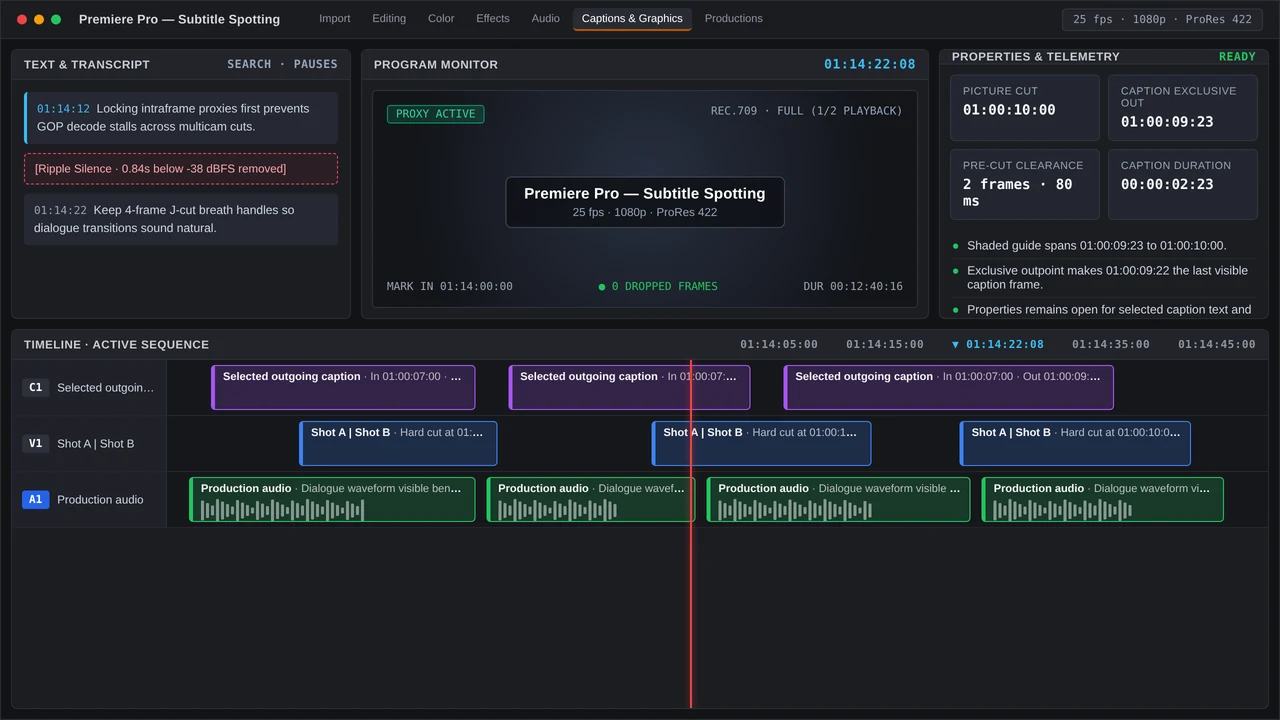
Before addressing the flagged events, mark every hard cut. Review comments from Frame.io v4 synchronise with markers in Premiere Pro at frame accuracy, so a remote QC operator can locate each collision at its exact timeline position [Frame.io Product Documentation, 2024]. Assess sound and image jointly at every marker. Set the outgoing subtitle’s outpoint 2 frames ahead of the cut, or shift the following inpoint to 2 frames after it, provided dialogue permits. After the gap value has been set, Excalibur, a utility from Knights of the Editing Table, can automate a trimming macro with several steps. Its licence requires a one-time payment of $100. The operator must still judge whether speech supports the change.
Within DaVinci Resolve Studio (v19/v20), use the Edit page to expand the track dedicated to subtitles and activate snapping. Cut-point shortcuts provide navigation from one picture edit to the next, after which 1-frame stepping permits a close examination of the clearance. Read the in and out timecodes from subtitle timing fields within the Inspector; the visible gap width at a particular timeline zoom is an unreliable measure.
Although Neural Engine transcription can produce the first event list, every relationship to a cut remains subject to inspection. Loudness verification against the broadcast target of -23 LUFS takes place on the Fairlight page. The perpetual $295 licence for Resolve Studio covers the essential transcription, subtitling and audio toolset; AI workflow plugins from third parties can accelerate rough spotting. Premiere Pro retains the larger ecosystem of styled-caption templates. An agency MOGRT handoff stipulated by contract must therefore be settled before Resolve is adopted for the caption workflow.
Common Timeline Bottlenecks and QC Checks
Particular care is needed wherever speech continues through a picture edit. Continuing dialogue can justify a subtitle crossing that cut, so the audio relationship should be assessed before any event is shortened. Dense talking-head cutting frequently employs a 4-to-8-frame J-cut, in which the next voice arrives ahead of its associated picture [Premiere Pro Dialogue Editing Best Practices, 2025]. This advance alters where the transition seems to occur. The audio-leading point consequently supplies the spotting reference; the adjusted event still needs checking against the visible edit.
Even a minor loss of duration can breach the reading-speed ceiling when an event already runs at 20 CPS. Dividing it into two shorter events can make room for the cut, provided both portions remain readable. Any small relaxation of reading speed should be entered within the QC report. This choice has to precede export of a burned-in master, because correcting the timing afterwards means rendering the picture once more.
Each flagged cut needs verification of the relevant 2-frame clearance on either side, except where uninterrupted dialogue supports an event spanning the edit. Confirm that the cut frame contains no subtitle outpoint, and repeat the CPS calculation following every trim. After the audio edit has stabilised, measure loudness again across the entire programme for the broadcast master. The subtitle timing from that version may carry over to a -16 LUFS social re-master, although its burned-in export still calls for inspection. Before the export is released, log all approved timing exceptions with their corresponding timecodes and event IDs.
[Netflix Partner Help Center Timed Text Style Guide, 2025] · [EBU R128 Loudness Recommendation, 2024] · [Verizon Media & Publicis Mobile Viewing Study, 2024] · [Edison Research Infinite Dial & Podcast Consumer Report, 2025] · [YouTube Official Blog, 2025] · [Premiere Pro Dialogue Editing Best Practices, 2025]